Your cart is currently empty!
Tag: seniors
Driving and Aging: When to Hand Over the Keys
Giving up driving is one of the hardest decisions many older adults face. Driving represents independence, freedom, and the ability to stay socially connected. But at some point, safety may need to take priority. There’s no exact age when someone should stop driving, and the right decision often depends on a mix of medical, cognitive, and physical factors. This guide walks through how seniors and their families can evaluate driving ability and find ways to stay mobile without a car.
Prepare for the Possibility
Just like setting up a will or power of attorney, it’s a good idea to talk with your family and decide on clear signs for when it might be time to stop driving. Have this discussion before any problems come up. That way, you can all agree on what signs to look for and avoid tough decisions later when emotions might be running high.
In addition to having a clear plan for when it’s time to give up the keys, be sure to also plan for other alternatives so you still have transportation (and independence!). Keep reading for transportation options.

Warning Signs That It Might Be Time to Stop Driving
Signs that driving may no longer be safe include:
- frequent close calls or accidents
- getting lost on familiar routes
- confusion between the gas and brake pedals
- delayed responses to traffic signals
- increased anxiety or frustration while driving
Family and friends may also notice dents on the car, receive complaints from others, or a reluctance to drive at night or in unfamiliar areas. These signs are often gradual, and it’s important to pay attention to changes over time.
What the DMV Can Tell You
The Department of Motor Vehicles (DMV) in many states has specific rules or guidance for older drivers. For example, some states require drivers over a certain age—often between 70 and 80—to renew their license in person, rather than online. They may also require vision tests, written exams, or even road tests. State requirements vary, so it’s worth checking with your local DMV or visiting NHTSA’s Senior Driving site for resources.
How to Get Evaluated
If you’re noticing warning signs in the driver, it’s a good idea to start with a conversation. Ask if they’ve noticed any challenges. Sometimes, seniors already feel less confident and are open to cutting back.
A medical check-up can also help rule out reversible issues such as medication side effects, vision changes that can be helped, or early-stage illness.
You can schedule a formal driving evaluation through AAA. As the AAA site says, “Think about getting a professional driving assessment the same way you look at visiting your doctor for annual wellness checkups – as a smart way to identify and manage any physical or mental changes.”
Before a complete stop on driving is needed, consider setting limits instead of stopping completely: only drive during daylight, avoid highways or bad weather, or stick to familiar routes. This gives the driver some control while reducing risk.

Planning for Life After Driving
Losing the ability to drive doesn’t have to mean losing independence. It just means using new ways of getting around. Having these options in place and even using them before you have to can minimize frustration and make the transition a little easier.
Here are some practical options:
- Uber Assist – is designed for seniors and people with disabilities. Drivers are trained to offer additional assistance, such as helping passengers in and out of the car.
- Uber Phone booking: Rides can be booked over a smartphone by calling in. It is the same Uber service, just done outside of the app.
- Lyft Silver: A simpler version of the Lyft app designed for seniors who do not need help in and out of the vehicle.
- GoGoGrandparent: a third-party service that works with both Uber and Lyft to help seniors and disabled people access rides (and other services) using a landline or basic phone
- Volunteer Driving Programs: Nonprofits and faith-based groups often have volunteers who provide rides to medical appointments, grocery stores, or social activities.
- Community Shuttles: Senior centers, local governments, or housing developments may provide scheduled shuttle services.
- Family and Friends: Create a shared driving calendar or set up a routine with loved ones for rides.

You might also consider delivery services for groceries and medications, or telehealth appointments to reduce the need for transportation.
The decision to stop driving is rarely easy, but it doesn’t have to mean giving up independence. With a thoughtful plan and familiar transportation options in place, the transition can feel manageable—just like any other life change. If you’re helping a loved one navigate this step, offer support through compassion, clear information, and practical solutions.

Power of Attorney (POA): Everything You Need to Know
One of the most important tools for making sure our parents financial and medical needs are handled smoothly is a Power of Attorney, or POA. This legal document allows someone your parent trusts to make decisions and act on their behalf if they become incapacitated. Below is everything you need to know about Power of Attorney (POA).
Key Takeaways:
- Having a POA means you can step in to access medical records and make health and financial decisions on an aging parent’s behalf.
- A Durable POA (DPOA), rather than a general POA stays in effect if your parent becomes incapacitated.
- DPOA templates can be downloaded online free of charge by searching your state + POA. Note that your state may require separate forms for health and financial matters.
- The POA must be signed by both parties as well as witnesses or a notary.
- Without a POA you will need to become a court appointed guardian to legally help.
Why is the POA such a big deal?
Obtaining a signed POA is a simple yet crucial step in helping an aging parent. A POA ensures you can legally step in on your parent’s behalf to:
- access medical records and make healthcare decisions
- handle financial matters such as paying bills, filing taxes or buying and selling real estate
- make long term decisions such as living arrangements or applying for government benefits like Social Security or Medicaid

What happens if we don’t have a POA?
If your parent doesn’t have a POA and becomes unable to manage their affairs, no one—not even family—can legally help without going through the courts to be appointed as a guardian or conservator. This process is lengthy, time consuming and expensive. It also usually happens during an already stressful time!A POA avoids all of that by making sure someone your parent trusts is ready to step in right away.
Two types of POA’s: Standard, Durable
All POA’s let someone (called an agent or attorney-in-fact) act on behalf of another person (called the principal). There are different kinds, but the main distinction comes down to whether or not the authority continues if the principal becomes incapacitated. There are POA’s that solely cover medical or financial decisions but for our purposes we’ll discuss the 2 main types, non-durable and durable.
- Regular Power of Attorney (Non-Durable)
The most important thing to know if that this type of POA is not sufficient for long-term aging or medical planning because it automatically ends if the person becomes mentally or physically incapacitated. It’s the opposite of what you’d need to care for an aging parent. Non-durable POA’s are only used for short-term or specific tasks, like managing someone’s finances while they’re out of the country.
- Durable Power of Attorney (DPOA)
This is ideal for caring for an aging parent because it:
- Stays in effect even if the person becomes incapacitated.
- Allows you to plan ahead for serious illness or cognitive decline.
- Can be created to cover both financial and healthcare decisions.
There’s a third type of POA called a springing POA which “springs into effect” when the principal becomes incapacitated due to illness, injury or cognitive decline. This can be helpful for aging adults who want to preserve independence and don’t need help now (or don’t fully trust their agent). The drawbacks are that proof must be submitted to each of the principal’s doctors, financial institutions, government agencies etc. before you can act on their behalf.
If you’re not sure which POA you have, a Durable Power of Attorney will include language like: This power of attorney shall not be affected by subsequent disability or incapacity of the principal… You can also check with an elder care lawyer.
Where do I get Durable POA? Do I have to have a lawyer?
Your state most likely has a DPOA template you can print out, or you can do an online search for one to download. If the DPOA requires that you sign in front of a notary, you can usually find a notary public at your bank or a mailing and shipping store.
Be sure to use the POA that is specific to your state. Some states require 2 forms; one for financial matters and one for healthcare decisions so be sure to check if 2 forms are needed. Florida for example requires a POA for financial/legal items and then a Designation of Health Care Surrogate for medical and healthcare needs.
Do we need witnesses when we Sign?
Depending on the state in which your parent (the “principal”) resides, yes you both sign the POA, but signing must either be: witnessed by one or two people who aren’t already named as agents or beneficiaries, or witnessed and notarized by a licensed notary public. This helps prevent fraud and ensures the person signing understands the document and is not being exploited.
What do I do with the POA once it is Signed?
- Provide signed copies of the POA to all the organizations with which you might communicate on your parent’s behalf. Banks, financial institutions, doctors, Social Security, Veteran’s Affairs, and insurance providers are common examples.
- Check with each institution to see if you need to provide originals, copies or digital versions.
- Remember to store and keep a copy for yourself.
What If They Don’t Want to Sign?
You can’t force someone to sign a POA. It’s a voluntary legal decision so it’s best to have open, honest conversations to explain why it’s important, especially for their protection and convenience. However, if the person is competent and doesn’t want to sign, you might try suggesting a limited or springing POA. A springing Power of Attorney (POA) “springs” into effect after a specific event occurs—usually the incapacitation of the person. Another option is to involve a trusted doctor, social worker, or religious advisor who can help facilitate trust and clarity.
If the person still won’t sign and they become incapacitated without a POA, and you need to make decisions for them, you will have no choice but to go to court to be appointed guardian or conservator.
What if they’re not competent to Sign?
If the person lacks the capacity to understand the POA at the time of signing, the document is not legally valid.It’s important to note that a diagnosis of cognitive decline does not necessarily mean the principal can’t sign. The most important thing is that they understand the document at the time they sign. You can have a doctor evaluate mental capacity close to the signing date if there’s any doubt of mental capacity.
In general, the principal is considered competent to sign if they can clearly communicate these things:
1. They know they are giving someone else the authority to act on their behalf.
2. They can explain what the agent will be allowed to do (e.g., manage finances, make health decisions).
3. They can name and recognize the person they are appointing and why they trust them.
4. They know whether it starts now or only if they become incapacitated.
5. Make the choice voluntarily
If they are not competent to sign, you’ll need to apply for legal guardianship through the court system.
What does it mean if I have to become a Guardian or Conservator?
Without a POA, no one—not even close family—can access bank accounts, talk to doctors, or manage utilities without being appointed by the court.
- A guardian is appointed to make decisions about the principal’s health, living situation, and daily care.
- A conservator is responsible for financial and legal matters.
The same person can serve in both roles. The process to become this person requires you to appear before a judge and can take weeks or even months to complete because you’re at the mercy of the medical evaluator and attorney schedules as well as the court’s calendar.
The guardianship and conservator process also includes these expenses
- Court filing fees: These vary by state but can range from a few hundred to over a thousand dollars.
- Attorney fees: You’ll almost always need a lawyer to guide you through the guardianship process, and legal fees can add up to several thousand dollars.
- Court-appointed evaluations: A medical or psychological evaluations is usually needed to assess or sign off on the person’s capacity.
- Bonding Insurance also called a Surety Bond: to cover losses if the guardian mismanages funds or commits fraud.
Once the guardianship is granted, you will need to continually provide an inventory of all of your parent’s assets as well as a detailed accounting of how you manage their expenses. In other words, you will need to keep receipts of every expenditure made on their behalf.
If I can make financial decisions, does that mean I’m responsible for their debts?
No. As a POA, you’re managing your loved one’s finances with their money—not your own. You are not personally liable for their debts as long as you act within your legal duties and in their best interest.
A POA might sound like it is about giving up control, but really about having a safety net. It allows your parent to name someone they trust, with clear limits, so their health and finances are handled according to their wishes. The key is setting it up before there’s a problem.
Online Safety: A Guide to Avoid Spam and Scams
With the sheer volume of information we receive on our phones and online each day, even the most tech-savvy user might question if that text really did come from Amazon -or if that email even came from a human! Older adults are often targets of fraud not because they’re less capable, but because scammers assume they’re more trusting, financially stable, or less familiar with fast-changing technology.
Whether you’re a senior yourself or you’re helping a loved one navigate technology, here are practical tips to stay secure and in control online.
Avoiding Spam and Scams: Learn the Red Flags
Scammers often try to catch you off guard by creating a false sense of urgency or offering something that seems too good to be true. Whether it comes through email, text message (also known as smishing), or even social media, the tricks they use are often the same. Here are some common scam tactics and phrases to watch out for:
Pressure and Urgency
Scammers want you to act fast—before you have time to think. Watch out for messages that say:
- “Your account will be locked unless you act now.”
- “Final warning: immediate action required.”
- “Unusual activity detected—click to secure your account.”
Too Good to Be True
If it sounds amazing or completely unexpected, it’s likely a scam:
- “You’ve won a prize!”
- “You’ve been selected for a government refund or grant.”
- “Miracle cure available—limited time only!”
Fake Services and Deliveries
These are designed to look like real companies, but the goal is to steal your info:
- “Your package is waiting. Update delivery info here.”
- “Click here to reschedule your delivery.”
- “Confirm your banking info to receive your payment.”
How to Avoid Spam and Scams- What Can You Do?
Go to the source: If you think a communication might be legitimate, you can go to the source to check. For example, if an email says your Netflix account is locked, go directly to Netflix.com—not the link in the email.
Check the link before clicking: Links in emails or texts can lead to fake websites designed to steal your information, but did you know you can check the safety of these links without clicking?
Here’s how:
If you’re using a computer, you can hover the cursor over links. Hovering will show a preview of the web address before clicking, so you can see if the address appears legitimate.
To hover over a link on a smartphone or tablet, press and hold your finger on the link (this is called doing a “long press”). Doing a long press will make a small pop-up appear, showing the full web address.
Delete: And of course, if you don’t recognize the sender or weren’t expecting the message, you can simply delete.
Two Factor Authentication (2FA)
If this sounds high-tech or intimidating, don’t worry, it’s not! Two-factor authentication, (2FA) adds an layer of protection to your accounts, even if someone has your password.
Here’s how it works:
- You log in with your password as usual.
- You’re asked for a second form of proof—usually a code sent to your phone by text, or a pop-up notification.
- Even if a scammer has your password, they can’t access your account without the code on your phone.
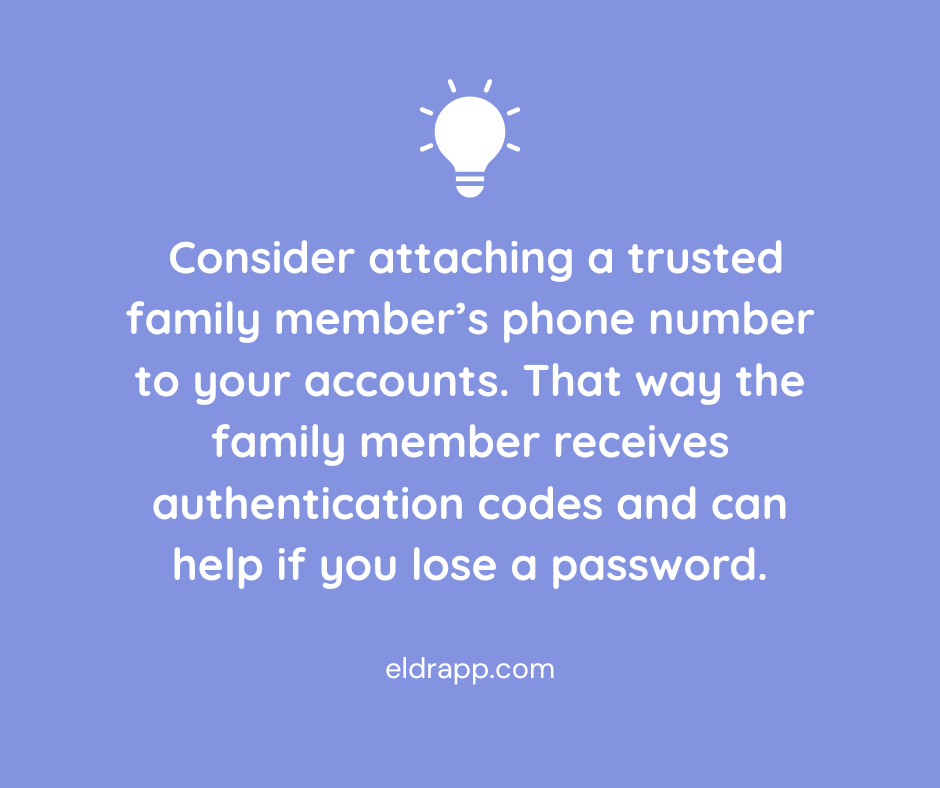
If you or a loved one have trouble managing 2FA, a helpful workaround is to attach a trusted family member’s phone number to your accounts. That way the family member receives authentication codes, reducing the risk of missed security alerts or confusion during account setup.
Apple ID/Google Account ID
If you’re a senior, or anyone really, consider sharing your Apple ID or Google Account ID for Android, with another trusted adult. In addition to setting up 2FA, access to the ID means:
- recovering lost or forgotten passwords; this is more than just convenient, it ensures you won’t be locked out of any email or other important accounts
- keeping devices stay updated with the latest security protections
- locating a lost or stolen device using Find My iPhone/Find my Device
- reviewing apps or subscriptions may be linked to the account, making it easier to cancel anything suspicious or unnecessary.
In any case having shared access to phones and devices means a second set of eyes (and hands) can respond quickly to protect data.
Turn on Email Spam Filters
Be sure spam filters are turned on in your email and then go one step further by marking suspicious emails as spam. This helps your email provider learn to filter better. If a spammer does get through, do not respond as the response confirms your email is active.
Text Messages and Incoming Calls
Text and voice call scams are becoming more common, even bombarding our phones many times in one day, so this topic deserves its own section! Once again these scams are designed to catch us off guard; they might appear to come from a contact we already know or use urgency to get us to click.
Here’s how to combat spam texts:
1. Do not click links or respond to unsolicited text messages.
2. Don’t reply, even if prompted to type STOP—this confirms your number is active and invites more spam.
3. Don’t call any numbers listed in the message – this also confirms your number.
4. If the message claims to be from a real company (like UPS or your bank), go directly to the company’s official website or call the customer service number on your card or statement. Sometimes the official website will even have a warning about the scam posted on their homepage.
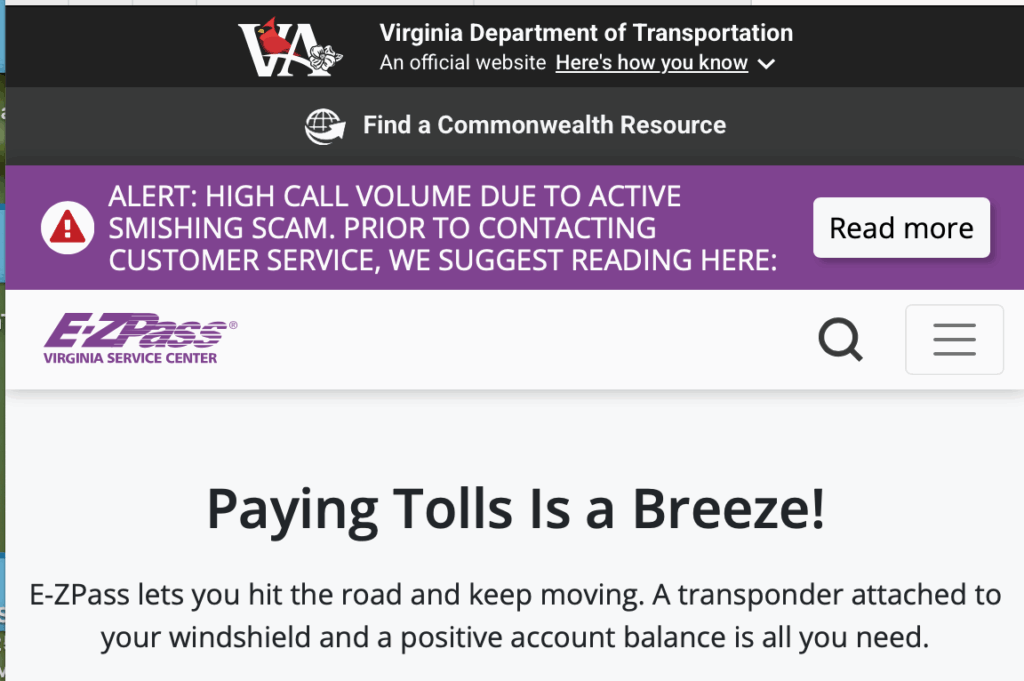
EZ Pass website warning about scam texts 5. Block and report spam texts using your phone’s built-in tools:
- On iPhone: Press and hold the message → Tap “More” → Tap the trash can → Then tap “Report Junk.”
- On Android: Press and hold → Tap the three dots → Select “Report spam” or “Block.”
- Forward spam texts to 7726 (SPAM) – This sends the message to your carrier for investigation.
Here’s how to minimize phone spam:
Both iPhone and Android offer Silence Unknown Callers or Spam Protection options. Here’s how to activate those:
On iPhone:
Go to Settings → Phone → Silence Unknown Callers → Turn it on.On Android:
Go to Phone app → Settings → Caller ID & Spam → Enable Filter spam calls.If you want to take even more aggressive action against spam calls, you can also install apps that offer more advanced call blocking. A few reputable options are Hiya, RoboKiller or CallControl.
Lastly, if someone calls messages asking for money or sensitive info, hang up and call the person on the phone to verify. Scammers have no shame and often impersonate real people.
Social Media and Social Gaming Sites

Scammers use fake accounts and messages to trick users on platforms like Facebook and Instagram as well as through social gaming sites. Stay safe with these reminders:
- Don’t accept friend or message requests from people you don’t know.
- Don’t share birthdays, pet names, or maiden names publicly. If you do, don’t use them in passwords or security questions.
- Be skeptical of messages that sound “off” from people you know; their account could be hacked or a scammer could be posing as them.
Email and Account Passwords
This advice is an oldie but a goodie: Use strong, unique passwords for every account. Mix letters, numbers, and symbols. If you reuse passwords, a hacker who gets one password can access multiple accounts. For sensitive accounts like banking, turn on two-factor authentication (2FA) for an extra layer of security.
The rule of thumb to avoid spam and scams is that if you’re unsure, just don’t click. Instead, contact the company or person directly using a phone number or email you know is legitimate. All official communications will always come from one known number, and you will never ask for passwords or sensitive info via text. Visit the AARP’s Scams & Fraud page for ongoing updates, or to report a suspected scam.